반응형
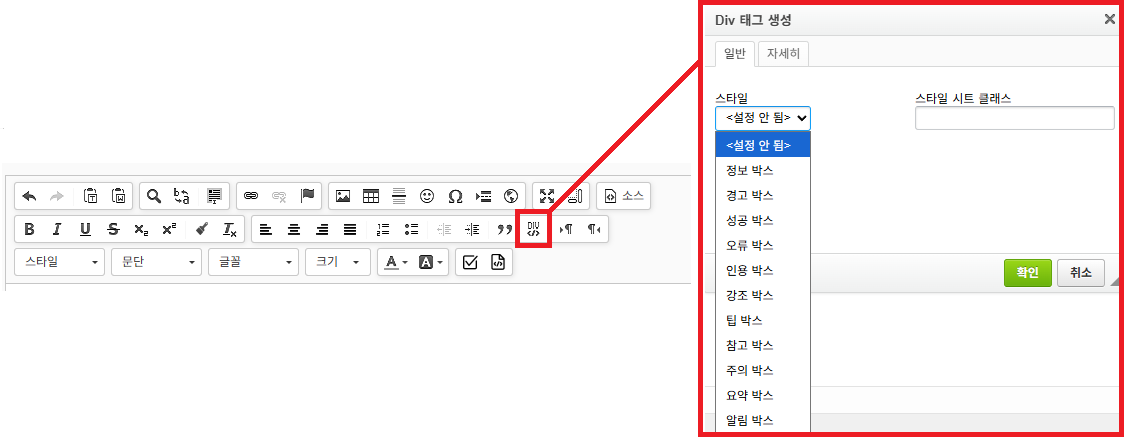
Ckeditor 기능 중에 Div 박스를 만드는 기능이 있다.
해당 기능을 사용하면 티스토리 블로그에 있는 인용 기능을 비스무리~ 하게 사용할 수 있다.
Div 박스 기능 위치는 아래 이미지와 같다.
스타일을 추가하는 방법은 간단하다.
`rhymix/common/js/plugins/ckeditor/ckeditor`
경로에 있는 styles.js 를 수정하면 된다.
현재 기준 38번 라인에 있는 스페셜 컨테이너 부분을 따라서 작성하면 편하다.
내 입장에선 js에 css 한땀한땀 만들려니 귀찮아서
디자인을 레이아웃 CSS 부분에 넣었다.
styles.js 예시
{
    name: '정보 박스',
    element: 'div',
    attributes: { 'class': 'info-box' }
},
{
    name: '경고 박스',
    element: 'div',
    attributes: { 'class': 'warning-box' }
},
{
    name: '성공 박스',
    element: 'div',
    attributes: { 'class': 'success-box' }
},
{
    name: '오류 박스',
    element: 'div',
    attributes: { 'class': 'error-box' }
},
{
    name: '인용 박스',
    element: 'div',
    attributes: { 'class': 'quote-box' }
},
{
    name: '강조 박스',
    element: 'div',
    attributes: { 'class': 'highlight-box' }
},
{
    name: '팁 박스',
    element: 'div',
    attributes: { 'class': 'tip-box' }
},
{
    name: '참고 박스',
    element: 'div',
    attributes: { 'class': 'note-box' }
},
{
    name: '주의 박스',
    element: 'div',
    attributes: { 'class': 'caution-box' }
},
{
    name: '요약 박스',
    element: 'div',
    attributes: { 'class': 'summary-box' }
},
{
    name: '알림 박스',
    element: 'div',
    attributes: { 'class': 'notice-box' }
},
css 예시
/* CKEditor 컨테이너 스타일 */

/* 정보 박스 */
.info-box {
	padding: 15px 20px;
	background-color: #e3f2fd;
	border-left: 5px solid #2196f3;
	margin-bottom: 20px;
	border-radius: 4px;
	color: #0d47a1;
	line-height: 1.6;
}

/* 경고 박스 */
.warning-box {
	padding: 15px 20px;
	background-color: #fff3cd;
	border-left: 5px solid #ffc107;
	margin-bottom: 20px;
	border-radius: 4px;
	color: #856404;
	line-height: 1.6;
}

/* 성공 박스 */
.success-box {
	padding: 15px 20px;
	background-color: #d4edda;
	border-left: 5px solid #28a745;
	margin-bottom: 20px;
	border-radius: 4px;
	color: #155724;
	line-height: 1.6;
}

/* 오류 박스 */
.error-box {
	padding: 15px 20px;
	background-color: #f8d7da;
	border-left: 5px solid #dc3545;
	margin-bottom: 20px;
	border-radius: 4px;
	color: #721c24;
	line-height: 1.6;
}

/* 인용 박스 */
.quote-box {
	padding: 15px 20px;
	background-color: #f8f9fa;
	border-left: 5px solid #6c757d;
	margin-bottom: 20px;
	border-radius: 4px;
	color: #495057;
	font-style: italic;
	line-height: 1.6;
}

/* 강조 박스 */
.highlight-box {
	padding: 15px 20px;
	background-color: #fff9c4;
	border: 2px solid #fbc02d;
	margin-bottom: 20px;
	border-radius: 4px;
	color: #5d4037;
	line-height: 1.6;
	box-shadow: 0 2px 4px rgba(0,0,0,0.1);
}

/* 팁 박스 */
.tip-box {
	padding: 15px 20px;
	background-color: #e8f5e9;
	border-left: 5px solid #4caf50;
	margin-bottom: 20px;
	border-radius: 4px;
	color: #2e7d32;
	line-height: 1.6;
}

/* 참고 박스 */
.note-box {
	padding: 15px 20px;
	background-color: #f5f5f5;
	border-left: 5px solid #9e9e9e;
	margin-bottom: 20px;
	border-radius: 4px;
	color: #424242;
	line-height: 1.6;
}

/* 주의 박스 */
.caution-box {
	padding: 15px 20px;
	background-color: #fff8e1;
	border-left: 5px solid #ff9800;
	margin-bottom: 20px;
	border-radius: 4px;
	color: #e65100;
	line-height: 1.6;
}

/* 요약 박스 */
.summary-box {
	padding: 15px 20px;
	background-color: #f3e5f5;
	border: 2px solid #9c27b0;
	margin-bottom: 20px;
	border-radius: 4px;
	color: #4a148c;
	line-height: 1.6;
	font-weight: 500;
}

/* 알림 박스 */
.notice-box {
	padding: 15px 20px;
	background-color: #e1f5fe;
	border-left: 5px solid #03a9f4;
	margin-bottom: 20px;
	border-radius: 4px;
	color: #01579b;
	line-height: 1.6;
}
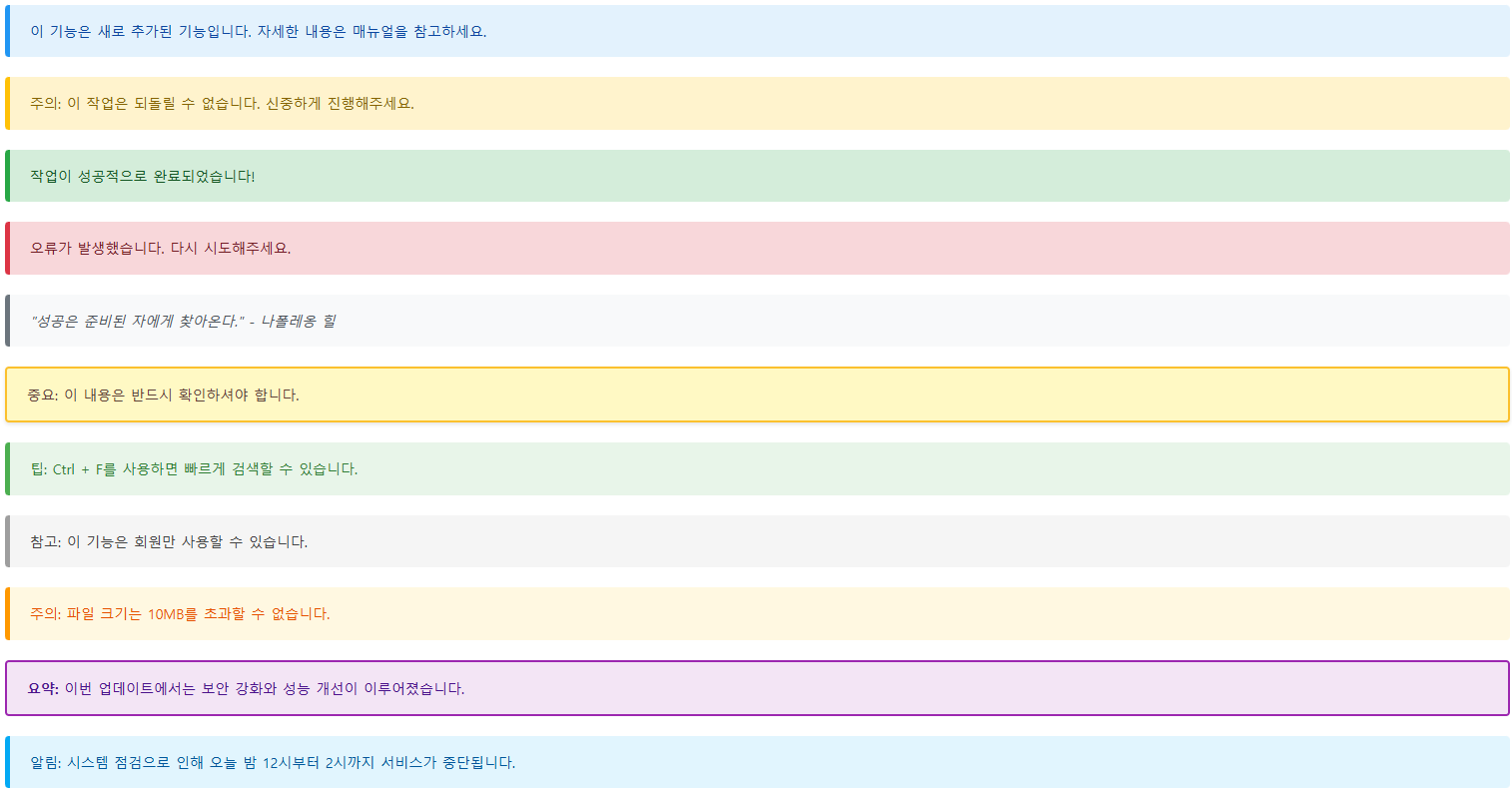
디자인은 이런식으로 나타난다.
반응형